
TIR-EPD Explained: Who Does What, and When, Before a Truck Reaches the Border
A practical guide to TIR-EPD, the IRU's electronic pre-declaration tool for TIR transports: who is involved, each step from loading to discharge, the most common mistakes, and Türkiye's pre-declaration rule.
By AntEX Team · October 29, 2026 · 12 min read
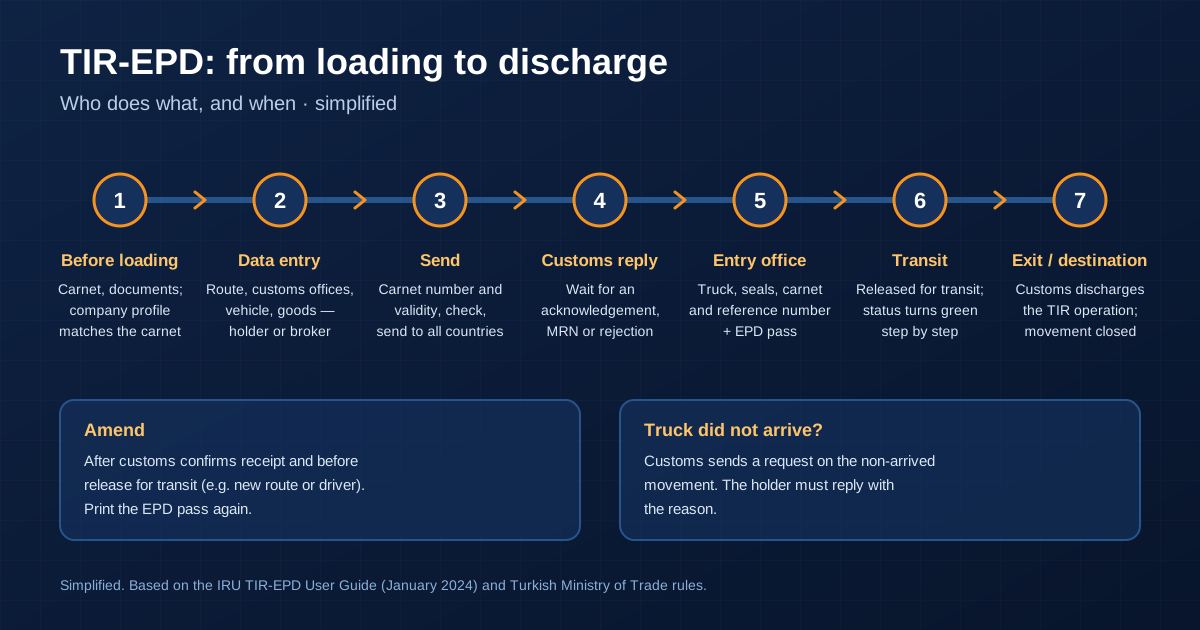
A TIR truck can be held at a border for reasons that have nothing to do with the cargo: a company name spelled differently from the carnet, a vague goods description, or a declaration that reached customs too late. Most of these problems start days earlier, at a desk, when the electronic pre-declaration is prepared.
This guide explains TIR-EPD, the IRU tool that many carriers use to send that pre-declaration. It covers who is involved, what happens at each step, and what goes wrong most often. It is based on the IRU's TIR-EPD User Guide (January 2024 version) and on the rules of the Turkish Ministry of Trade.
What TIR-EPD is, and what it is not
TIR-EPD is a web application run by the IRU. EPD stands for electronic pre-declaration. The holder of a TIR Carnet, usually the road carrier, uses it to send the cargo, vehicle and route data to the customs authorities on the route before the truck arrives. Customs can then check the data and run its risk analysis in advance.
According to the IRU, the application is free of charge for carnet holders, and it can send the pre-declaration to all countries on the route at the same time, so each one receives the same data. Access does not come from the IRU directly: a carrier gets its login through its national issuing association.
What TIR-EPD does not do is replace the carnet. In a classic TIR transport, the truck still carries the paper TIR Carnet, and customs still processes it at the border. TIR-EPD only sends the data ahead of the truck. The fully digital procedure, in which data replaces the paper, is eTIR. We explain it in our article on digital TIR along the Middle Corridor.
Who is who
The carnet holder (the carrier) The transport company named in the TIR Carnet. It is responsible for the TIR operation and for the pre-declaration. In TIR-EPD it manages its company profile, its users and its pre-declarations, and the company data in its profile must match the carnet. It also decides who may act for it: it can allow its association to send pre-declarations on its behalf, allow representatives to access and send its EPDs, and allow them to see vehicle and driver data. Inside the company, each user gets only the rights they need: managing company details, managing EPDs, managing guarantee orders, or managing users.
The broker or forwarder acting for the holder A customs broker or freight forwarder can prepare and send the pre-declaration for the carrier, but only if the holder has given that permission, and only by entering the holder's unique identifier. The holder can also share a sent EPD or a draft with them by link. The broker cannot change what the carnet says: the pre-declaration must still match it.
The issuing and guaranteeing association Each TIR country has a national association that issues TIR Carnets and guarantees them as part of the international guarantee chain. In Türkiye, this is TOBB, the Union of Chambers and Commodity Exchanges of Türkiye. The association gives carriers access to TIR-EPD (in Türkiye, through the chamber where the company handles its carnet operations). It is also the first contact when a pre-declaration cannot be sent or is rejected for an unclear reason. If the holder allows it, the association can send pre-declarations on the holder's behalf.
The IRU The International Road Transport Union runs TIR-EPD and manages the international guarantee chain behind TIR Carnets. It does not make customs decisions: whether a pre-declaration is accepted, and whether a truck is inspected, is up to customs. Technical questions about the application go to the association or to IRU support (tirepd@iru.org).
Customs at the office of entry Customs receives the pre-declaration and checks it. Part of the data is checked automatically for format and logistics consistency, and it can be rejected if it is incorrect. Customs replies with an acknowledgement, a reference number or a rejection. At the border, the officer compares the truck, the seals and the carnet with the data received. Customs can reject data that does not match the carnet, and it decides on any inspection. A pre-declaration does not mean that a truck will not be checked.
UNECE The TIR system is based on the United Nations TIR Convention of 1975, and UNECE (the UN Economic Commission for Europe) provides its secretariat. UNECE does not handle individual transports or pre-declarations. Its role is the convention itself: the rules that everyone in the chain works under, from the carrier to customs.
The timeline, step by step
1. Before loading
- The carrier needs a valid TIR Carnet from its association and access to TIR-EPD (or, for Türkiye, to the Ministry's own system, TIRCUS; see below).
- Its company profile in TIR-EPD must match the carnet. If the route includes the EU, the company's EORI number goes into the profile, and the application checks it automatically against the European Commission's EORI database.
- The carrier collects the documents: the commercial invoice, the packing list, the CMR consignment notes and the HS codes of the goods. In TIR-EPD, one consignment means goods sent from one consignor to one consignee under one CMR.
- If a broker will prepare the pre-declaration, the holder grants the rights in its profile and gives the broker its unique identifier.
2. Entering the data
The data is entered in six steps. A new EPD can be built from scratch or by duplicating an earlier one, and unfinished work is saved as a draft.
- Declaration start. Choose the type of guarantee. You can add a private note; it is not sent to customs.
- Itinerary. List all countries in order, from the first loading to the last unloading, including transit countries and legs that are not under TIR. Mark the start and end of the TIR operation and every place of loading and unloading. Legs between countries can be by road, rail, air or sea. For a 16-voucher carnet, the customs offices of departure and destination together cannot be more than eight. From the itinerary, the application works out which countries must receive the pre-declaration and which data each of them needs.
- Customs operations. Choose the customs offices along the route and, where a country asks for it, the movement reason: import, export or transit. Each country has a "Send EPD" box. The carnet voucher page numbers are calculated automatically, and countries in one customs union appear as a single line.
- Vehicle. Enter truck, trailer and container data. The driver field only appears if a country on the route requires it.
- Consignments and goods. Enter the consignor, consignee and documents, and for each goods item the commodity code, description, weight, packages, invoice currency and, where the code needs them, extra units of measure. Goods items can be imported from an Excel template.
- Send. Enter the TIR Carnet number and its validity date, check the summary, accept the terms, fill in the place of declaration, and send.
3. After sending: the customs reply
TIR-EPD shows a status for each customs office. The main ones:
| Status | What it means | What to do |
|---|---|---|
| Not sent / Not processed | The application is still sending the data | If it does not change within 10 minutes, tell the association or the IRU |
| Sent – wait for reply | Customs has the data and usually replies | Wait for the reply before going to customs. If none comes within 30 minutes, tell the association or the IRU |
| Acknowledgement received, go to customs | Customs confirmed receipt | Show the reference number to the customs officer |
| Confirmation received, go to customs | Customs gave an MRN reference number | Show the reference number to the customs officer |
| Sent – go to customs | This customs office does not send electronic replies | Show the reference number to the customs officer |
| Rejected, check the reason | Customs did not accept the data | Read the reason in the customs message, correct the data and send again, or ask the association |
4. At the entry customs office
The driver presents the truck, the sealed load compartment, the TIR Carnet and the reference number. TIR-EPD can print an "EPD pass": a summary in two languages (the language of the country the EPD was sent to, and the interface language) with the carnet number, the customs offices, the customs references and the registration dates. The driver can show it to the officer. The EPD pass also carries a PIN that a third party, such as the association or a broker, can use to help solve a problem. A CMR note can also be printed from the EPD data.
5. In transit
For each step of the route, TIR-EPD shows a movement status. When customs confirms a step, its icon turns from grey to flashing green. "Goods released for transit" means the goods were released and have left the customs office the EPD was sent to.
6. If something changes: amend or resend
- Amend. If the route or the driver changes, the EPD can be amended after customs has confirmed receipt and before the goods are released for transit. Customs then cancels the original data and works with the new version. The IRU guide says to print the updated documents from TIR-EPD, including the EPD pass, after every amendment.
- Resend. This is for a different problem: an EPD that never reached customs because of a connection problem.
- Attachments. Scans of documents can be uploaded and shared with the association, but they are not sent to customs. The documents for customs still travel with the truck.
7. Exit, destination and discharge
At the office of exit or destination, customs ends the TIR operation in its territory. In TIR-EPD this appears as "Customs discharged your transit operation": the movement is closed. The status "Customs cancelled your data" means the pre-declaration was cancelled, for example because the truck was not presented within a set time, or because an amended version replaced it.
8. When a truck does not arrive
If the truck does not reach the office of exit or destination, customs can send a "Request on non-arrived movement". The holder must open the message and reply with the reason. Do not leave it unanswered: a TIR operation that is not closed properly can lead to further questions from customs and, in the end, to a claim on the guarantee.
What goes wrong most often
- Data that does not match the carnet. Holder name, address, carnet number, goods: if the pre-declaration and the carnet differ, the officer at the border can reject the EPD.
- Vague or wrong goods descriptions. The description must match the carnet. If the code search fills in a general text such as "Others", replace it with the real description from your invoice and CMR. Use the codes that the search tool marks as valid for each country.
- EORI mismatch. For EU countries, the company's data must match the EORI database, or the EPD can be rejected.
- Duplicate consignors and consignees. Adding the same partner twice can cause problems in some countries. Choose existing records from the list.
- Sending too late. In Türkiye, the pre-declaration must be in before the truck reaches the entry customs office. A late one leads to extra risk checks, and a missing one means the carnet is not processed.
- Going to customs before the reply. "Sent – wait for reply" is not a green light. Wait for an acknowledgement, a confirmation, or a rejection you can fix.
- Expecting attachments to reach customs. They do not.
Türkiye: the pre-declaration rule
The Turkish Ministry of Trade made a pre-declaration (ön beyan) mandatory for transports under a TIR Carnet from 25 April 2017. Its announcement and its information sheet on the Ministry's own system, TIRCUS, say:
- The carrier must send the pre-declaration electronically to the entry customs office before the vehicle enters the Turkish customs territory. This includes trucks that arrive by Ro-Ro.
- It can be sent through TIRCUS or through the IRU's TIR-EPD.
- If there is no pre-declaration, the entry customs office does not process the TIR Carnet until one is sent.
- If the pre-declaration is sent after the vehicle has arrived at the entry customs office, the carrier and the goods are assessed separately against risk criteria.
- In TIRCUS, the pre-declaration can be filled in in Turkish or English. The goods description should be in Turkish; if the Turkish description is not known, English can be used.
- Foreign companies with a Turkish tax number or foreigner ID number can be authorised to declare on their own behalf in TIRCUS.
- According to a Ministry announcement of 1 October 2026, TIRCUS can now only be accessed with an e-Devlet or e-İmza login.
The 2017 announcement is the most recent text we found on the rule itself. Before a new route, check the current practice with your broker or the entry customs office.
What shippers should do
- Ask your carrier who sends the pre-declaration, through which system (TIR-EPD or TIRCUS), and at what point before the border.
- Send your documents early: commercial invoice, packing list, HS codes, and consignor and consignee details exactly as they will appear on the carnet and the CMR.
- Use precise goods descriptions. Avoid general words such as "parts", "accessories" or "others".
- Keep one spelling of company names and addresses across the invoice, CMR, carnet and pre-declaration.
- Check the EORI numbers of the parties involved if the route crosses the EU.
- Ask for the customs reference number before the truck reaches the border.
- Report changes early. If the route or the driver changes, the pre-declaration must be amended before the goods are released for transit, not after.
A clean pre-declaration does not remove the border, but it removes the problems that start at the desk. At AntEX we check the data before the truck leaves, so that the invoice, the CMR, the carnet and the pre-declaration tell the same story at every border.
Have questions about the documents for your next shipment? Tell us where your cargo needs to go — we’ll find the way. Request a quote
Sources
- IRU: TIR-EPD User Guide (version January 2024), tirepd.iru.org (access through the issuing association)
- IRU: TIR-EPD leaflet
- Turkish Ministry of Trade: TIR Karnesi Kapsamı Taşımalarda Ön Beyan Verilmesi Zorunluluğu 25 Nisan 2017 tarihinde Başlıyor (7 April 2017, in Turkish)
- Turkish Ministry of Trade: TIR Ön Beyan Sistemi (TIRCUS) information sheet (Turkish and English)
- Turkish Ministry of Trade: TIRCUS Uygulamasına Girişlerde e-Devlet ve e-İmza Kullanımı Hakkında (1 October 2026, in Turkish)
- TOBB: TIR Elektronik Beyan İşlemleri (in Turkish)
Please note: This article is general information, not legal or customs advice. Border gate status, working hours, and rules can change at short notice. Always check the latest position with the Turkish Ministry of Trade, the authorities of the other country, or your customs broker before you ship.
Lawful by nature
We move what matters — within the rules of international trade. Every shipment is checked with care, and we do not handle sanctioned goods.